5 Best AI Tools to Replace a Character in a Video With the Same Motion (2026)
By Nuno AI Team · Updated · 7 min read
In this guide
- What is the best AI tool to replace a character in a video?
- Can Google Veo or Sora replace a character in a video?
- How does AI character replacement work?
- The 5 best AI character replacement tools in 2026
- Which one should you choose?
- How to get a clean result (with any tool)
- Is it legal to replace a person in a video with AI?
- Sources
Short answer: the 5 best AI tools to replace a character in a video with the same motion are Nuno Mimic (done for you, pay once per finished video), Kling 3.0 Motion Control, Higgsfield Genjutsu, Runway (Aleph 2.0 and Act-Two) and Viggle Mix. All five keep the original movement and swap who is doing it. The difference is who does the work and how you pay.
You found a viral video. You want the same video, same moves, same timing, but with your character in it: you, your mascot, your product, your anime OC. That job has a name, AI character replacement (also called motion transfer or video-to-video character swap), and in 2026 there are five tools worth using for it. We compared them using each company's own documentation and pricing pages.
What is the best AI tool to replace a character in a video?
| Tool | How it works | Video length | How you pay | Who does the work |
|---|---|---|---|---|
| Nuno Mimic | Our team transfers the motion onto your photos and checks the result | 4 to 30 seconds | Once per finished video, no account | Our team |
| Kling 3.0 Motion Control | Reference video plus one character image | 3 to 30 seconds | Credits, monthly plans or top-up packs | You |
| Higgsfield Genjutsu | Motion Transfer or Object Swap on an existing clip | 4 to 30 seconds | Credits, subscription needed for packs | You |
| Runway Aleph 2.0 and Act-Two | Edit the clip with a prompt or image, or drive a character with a performance video | Varies by model | Credits, monthly plans | You |
| Viggle Mix | Swap a single character in a clip | Short clips | Free tier with watermark, or monthly plans | You |
If you want the shortest path from "I have this video" to "I have my version", start with number 1. If you want to drive the tool yourself, Kling is the strongest all-rounder.
Can Google Veo or Sora replace a character in a video?
No. Google Veo and OpenAI's Sora are video generators: they make new clips from a text prompt or an image, and they can look great. But they do not take your existing video and copy its exact motion onto a new character, which is what a viral swap needs. Sora's app also closed in April 2026. For character replacement you need a motion transfer tool like the five below.
How does AI character replacement work?
There are three ways tools do it, and knowing which one you need saves a lot of failed attempts:
- Motion transfer. The AI reads the body movement from the original video and makes your character perform it. Best for dances, memes and skits. Used by Nuno Mimic, Kling Motion Control, Genjutsu's Motion Transfer mode and Viggle.
- Object swap. The AI replaces only the person you point at and keeps the rest of the shot exactly as filmed: background, camera, other people. Used by Genjutsu's Object Swap and Runway Aleph.
- Performance capture. You record yourself acting, and the AI makes a character copy your face, body and hands. Used by Runway Act-Two.
For the classic "this viral clip, but with my character" video, you want motion transfer.
The 5 best AI character replacement tools in 2026
1. Nuno Mimic: done for you, pay once per video
Nuno Mimic is our own service, and it is the only one on this list where you do not operate the AI yourself. You pick a clip from the trending library or upload your own video, add photos of your character, product or outfit, and our team makes the video, checks it, and emails it to you.
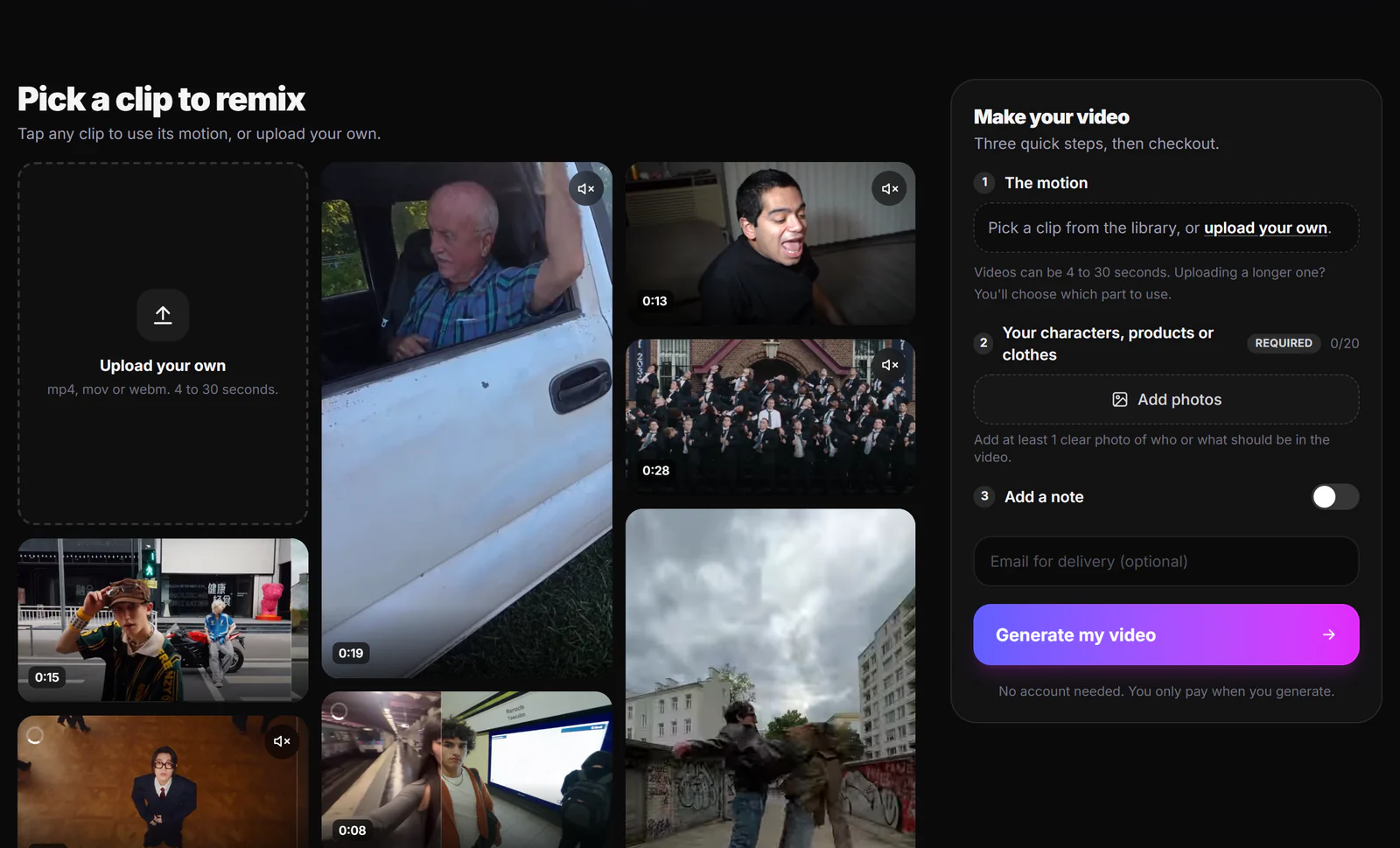
- How you pay: once per finished video, priced by length and quality (480p, 720p or 1080p) and shown before you pay. No subscription, no credits, no account. Short 480p clips start at $1.49.
- Bad results: you never pay for them. If the face drifts or a hand breaks, we fix it before delivery. Your first purchase is covered by our 30-day money-back guarantee (conditions apply).
- Speed: ordering takes about two minutes, and most orders are ready within a few hours.
- Launch offer: at the time of writing, new visitors get 50% off 720p and 1080p videos for a limited time.
Best for: anyone who wants the finished video and not a new tool to learn. Replace the character in your video with Nuno Mimic.
2. Kling 3.0 Motion Control
Kling's Motion Control takes a reference video (3 to 30 seconds) and a character image, and transfers the full-body motion onto the character, with lip-sync and facial expression control. It runs on Kling VIDEO 3.0 and 2.6, and Kling suggests it for dance videos and copying action scenes.
- How you pay: credits per generation, based on model, resolution, length and mode. Monthly plans start at $6.99 for the first month (then $8.80) for 660 credits. Separately bought top-up packs last 2 years; unused monthly credits do not roll over.
- The catch: failed generations are free, but a finished video that looks wrong still costs credits.
Best for: hands-on creators who want strong motion quality and will iterate.
3. Higgsfield Genjutsu
Genjutsu is Higgsfield's video-to-video tool, launched at the end of August 2026. It has two modes: Motion Transfer pulls the motion out of a clip and builds a new scene around it, and Object Swap replaces only the element you choose and keeps the rest of the shot. It takes a 4 to 30 second clip and up to 30 reference images, and outputs up to 1080p.
- How you pay: credits. Higgsfield lists a 15-second clip at 40 credits (about $2) at 480p, 104 (about $5.20) at 720p and 144 (about $7.20) at 1080p. One-time credit packs need an active subscription and expire after 90 days.
Best for: Object Swap edits where the background must stay exactly as filmed. We go deeper in our Higgsfield Genjutsu review and alternatives.
4. Runway Aleph 2.0 and Act-Two
Runway has two tools for this. Aleph edits an existing video from a text prompt or a reference image, for example "replace the man with a cartoon bunny", and Aleph 2.0 is listed on the Standard, Pro and Max plans. Act-Two is performance capture: you load a driving video of someone acting and a character image or video, and the character copies the face, body and hand movement.
- How you pay: monthly plans with credits. The free plan has 125 one-time credits; Standard is $12 a month billed yearly ($15 monthly).
Best for: filmmakers and editors who want precise edits on their own footage.
5. Viggle Mix
Viggle made the "put anyone in a meme" format popular. Its Mix feature swaps a single character in a clip using a photo. It is fast and has a free tier (5 videos a day, watermarked), but faces and busy scenes are less precise than the tools above.
- How you pay: free with watermark, or monthly plans; the pricing page lists Pro at $7.99 a month.
Best for: quick memes and testing an idea for free.
Which one should you choose?
- You want the video, not the tool: Nuno Mimic. Pick a clip, add photos, done.
- You only want to pay once: Nuno Mimic is the only option here with no subscription and no account, and you pay for a finished video rather than for each attempt.
- You want full control and will iterate: Kling 3.0 Motion Control.
- The background must not change at all: Higgsfield Genjutsu Object Swap or Runway Aleph.
- You are acting the performance yourself: Runway Act-Two.
- You just want to try it for free: Viggle.
How to get a clean result (with any tool)
- Pick a clean source video. One main person, full body in frame, steady lighting, no hard cuts.
- Use clear character photos. Front-facing, well lit, at least one full-body shot. Match the pose and framing of the video where you can.
- Keep it short. 8 to 15 seconds is the sweet spot for viral clips and the easiest length to get right.
- Check faces and hands. Watch the result at full screen before posting; head turns and fast hand moves are where swaps break.
- Post it natively. 9:16, the original sound or a trending one, and an AI label where the platform asks for one.
For the full process from finding the trend to posting, see how people make viral AI videos.
Is it legal to replace a person in a video with AI?
It depends on what you use. Use characters, products and photos you own or have permission to use, and be careful with real people's faces and copyrighted characters. Most platforms also ask you to label realistic AI content. When in doubt, use your own character or your own face.
Sources
- Kling AI product and credits overview (kling.ai/llms.txt)
- Higgsfield Genjutsu announcement
- How Higgsfield credit packs work
- Runway pricing
- Act-Two: expressive character performances, Runway Academy
- Runway Aleph overview, No Film School
- Viggle pricing
Facts checked October 10, 2026. Prices and features change often; check each site before you buy.
Frequently asked questions
What is the best AI tool to replace a character in a video with the same motion?+
For a finished video without learning a tool, Nuno Mimic: you pick or upload the clip, add photos, and the team makes it and you pay once per video. To do it yourself, Kling 3.0 Motion Control is the strongest all-rounder, with Higgsfield Genjutsu and Runway Aleph best for edits that keep the background unchanged.
Can AI replace a person in a video and keep the same movements?+
Yes. Motion transfer tools read the body movement from the original video and make a new character perform it with the same timing. Kling Motion Control, Higgsfield Genjutsu, Viggle and Nuno Mimic all do this.
Is there an AI character replacement tool without a subscription?+
Nuno Mimic needs no subscription or account: you pay once per finished video, priced by length and quality and shown before you pay. Most DIY tools sell credits through monthly plans.
How long can the video be?+
Kling Motion Control takes 3 to 30 second reference videos, Higgsfield Genjutsu 4 to 30 seconds, and Nuno Mimic 4 to 30 seconds. For viral clips, 8 to 15 seconds is usually best.
Why does the face change in my AI character swap?+
Head turns, profile shots and hands crossing the face make video models lose track of identity. Use clear, front-facing reference photos and a clean source clip, or use a done-for-you service like Nuno Mimic where a person checks and fixes the result before delivery.
Can Google Veo or Sora copy the motion of a video onto my character?+
No. Veo and Sora generate new videos from text or images, but they do not do motion transfer from an existing video. For that you need a motion transfer tool such as Nuno Mimic, Kling Motion Control, Higgsfield Genjutsu or Viggle.
Put your character in a viral video
Pick a trending clip or upload your own, add photos of your character, product or outfit, and we make the video for you. No account, no prompts.
Try Nuno Mimic →